Tolerance Analysis Software for Mechanical Engineers that saves engineering time and effort while increasing quality
No spreadsheets, no app switching, streamlined process.
Automated Setup
Tolerance Analysis: auto identification of tolerance chains.
Delete Unnecessary Constraints
Interface Analysis: Actionable insights directly from your CAD.
The Excel Tolerance Sheet Killer
Calculations, updates, cross references, without any headaces.
✓ Intial Set-up Call ✓ No Install ✓ ISO27001 Certified
Day 15: decide what's next.
Who it's for
Mechanical design teams, from small teams to enterprise plans who want to excel in dimensional variation analysisl in a collaboration (cloud) friendly environment. ISO 27001 certified.
What it does
Tolerance chain identification. 1D, 2D and 3D tolerance stacks-ups.
Actionable insights for design optimization.
Algebra and variables instead of cell references and excel formulas.
CAD compatibility
The software is CAD agnostic. Import STEP and dataset from platforms such as SolidWorks, NX, CATIA, and Creo.
Methods
The software supports variation simulation in worst case, RSS (Root Sum Square), statistical, Monte Carlo scenarios.
Time to Value
1-day onboarding and a free 14-day trial.
Onboarding also includes 30-day hypercare with experienced engineers.
Trusted by engineering teams building high‑performance mechanical products



Replace Excel-Based Tolerance stack-up Analysis
While Excel is often used for tolerance analysis, it introduces risk, inefficiency, and scaling issues as products and assemblies grow more complex.
While spreadsheets are very flexible - they can also be the root cause misaligned work.
Advantages of using a dedicated tolerance analysis tool:
Skip tedious workflows in-and-out of apps. Screenshot in CAD, illustration in Power Point, stack-up calculations in Excel. Where is the mother illustration? Where is the matching assembly file? Which is the latest?
Tired of spreadsheets that break, freeze/white screen, become inconsistent, are hard to update, cannot support multi-user access when macros are present, broken links, broken references, malfunction when calculations cells are deleted, sheet is broken if a line is inserted... the list goes on...
Tired of Excels limitations? Not possible to do asymmetric tolerances, Monte Carlo Simulations run slow, not able to run sensitivity studies, cannot see who did the last edit, ...
BUILDING THE WORLD'S BEST
MECHACNICAL KEYBOARD WITH
RD8 TEchnology
RD8 Software suggests an optimized version of the original design. All green...
"And it did actually solve the problems as promised, the performance of that initial solution is quite excellent..."
"The product itself is a completely different product than it would have been if I had never spoken to RD8"
"We have two totally diffent patented solutions to this problem, that people have been working on for decades in the keyboard community and nobody had come anythere close to solving."
Find every dimension that can fail
before you order tools.
Upload a STEP file and get all critical interfaces with their stack-up risk.
No setup, no GD&T expertise required.
"Is there anything in this assembly that will bite me?"
"Which tolerances actually matter, so I don't over-spec and overpay?"
"Prototype didn't perform as expected, boss wants to know why, I need an answer today."
Sign up for a free RD8 Software Trial
By submitting, you accept RD8's Privacy Policy and Terms of Service.
✓ 14 Days ✓ Secure Cloud (ISO27001 Certified) ✓ No Install
Why engineers move from Excel to RD8 Tolerance Analysis software
Engineers choose RD8 due to simplicity and yet it's very advanced functions.
It is the natural step from Excel - bringing all the flexibility from Excel: quick edits and tabular form, thus storing, managing and maintaining it in secure, professional and limitless environment.
How RD8 Tolerance analysis software works
RD8 is designed to cater and adapt to different engineering environments, product complexities, and organizational maturity levels.
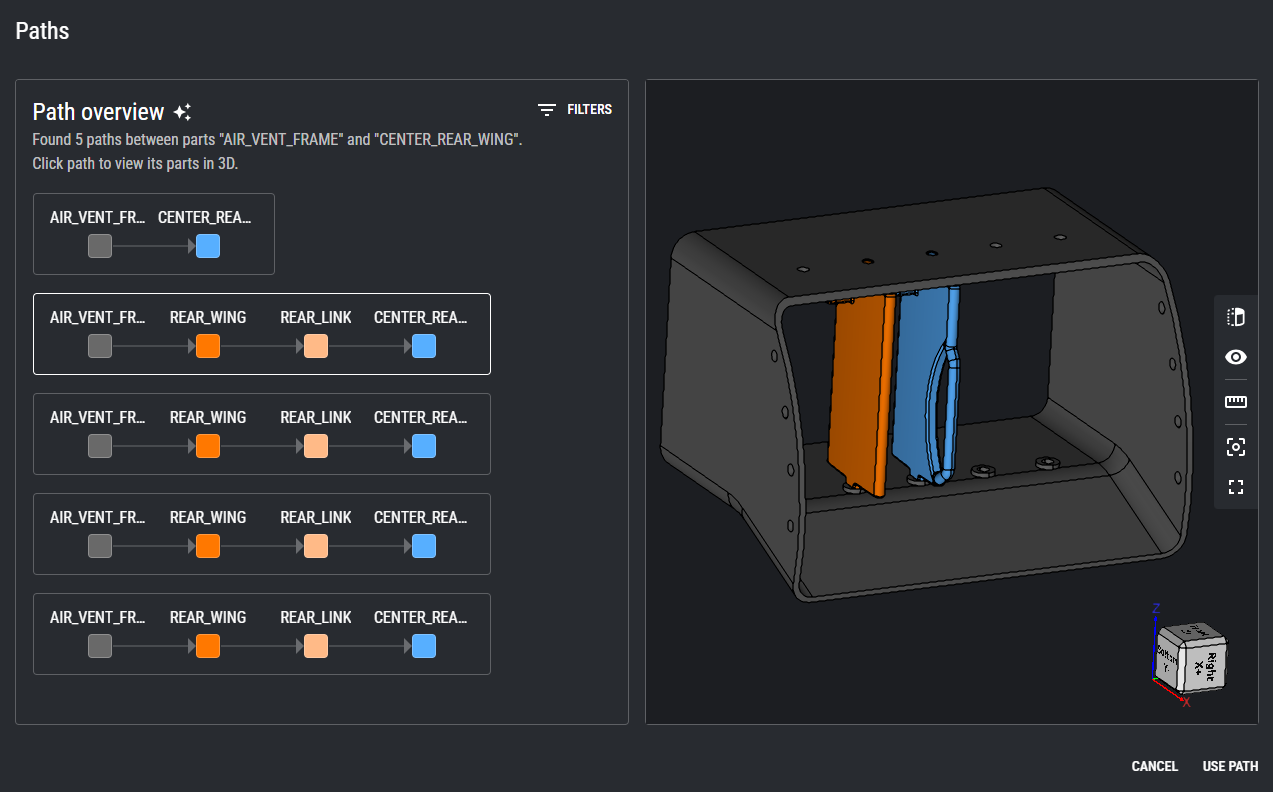
Import CAD model + dataset and let RD8 map out all relations between parts.
When setup once - you can easily push new files/updated from CAD with the Iterations Feature.
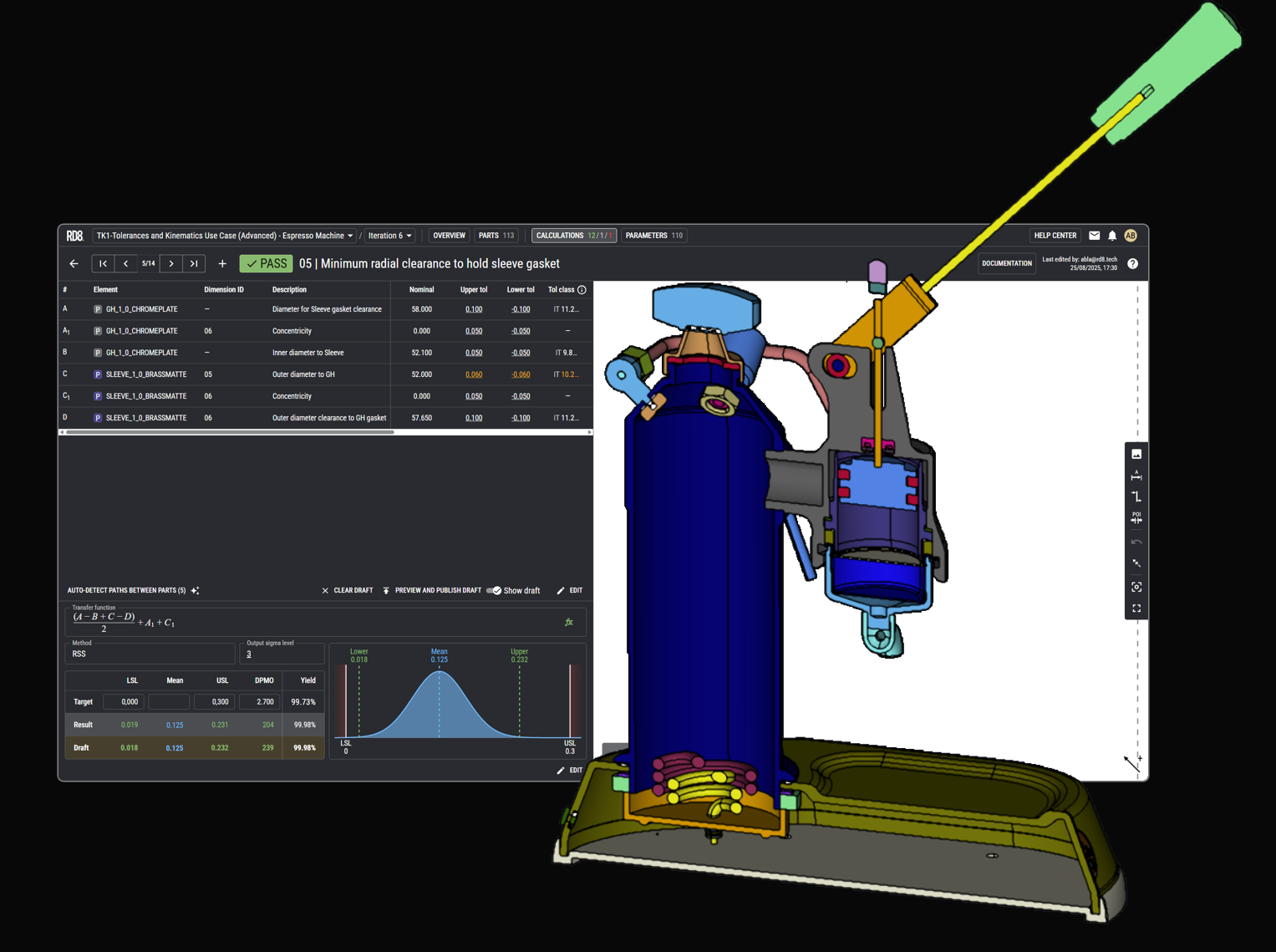
Set-up and document the stack with the World's First Path Finder.
Let RD8 sanity check if your stack is without errors.
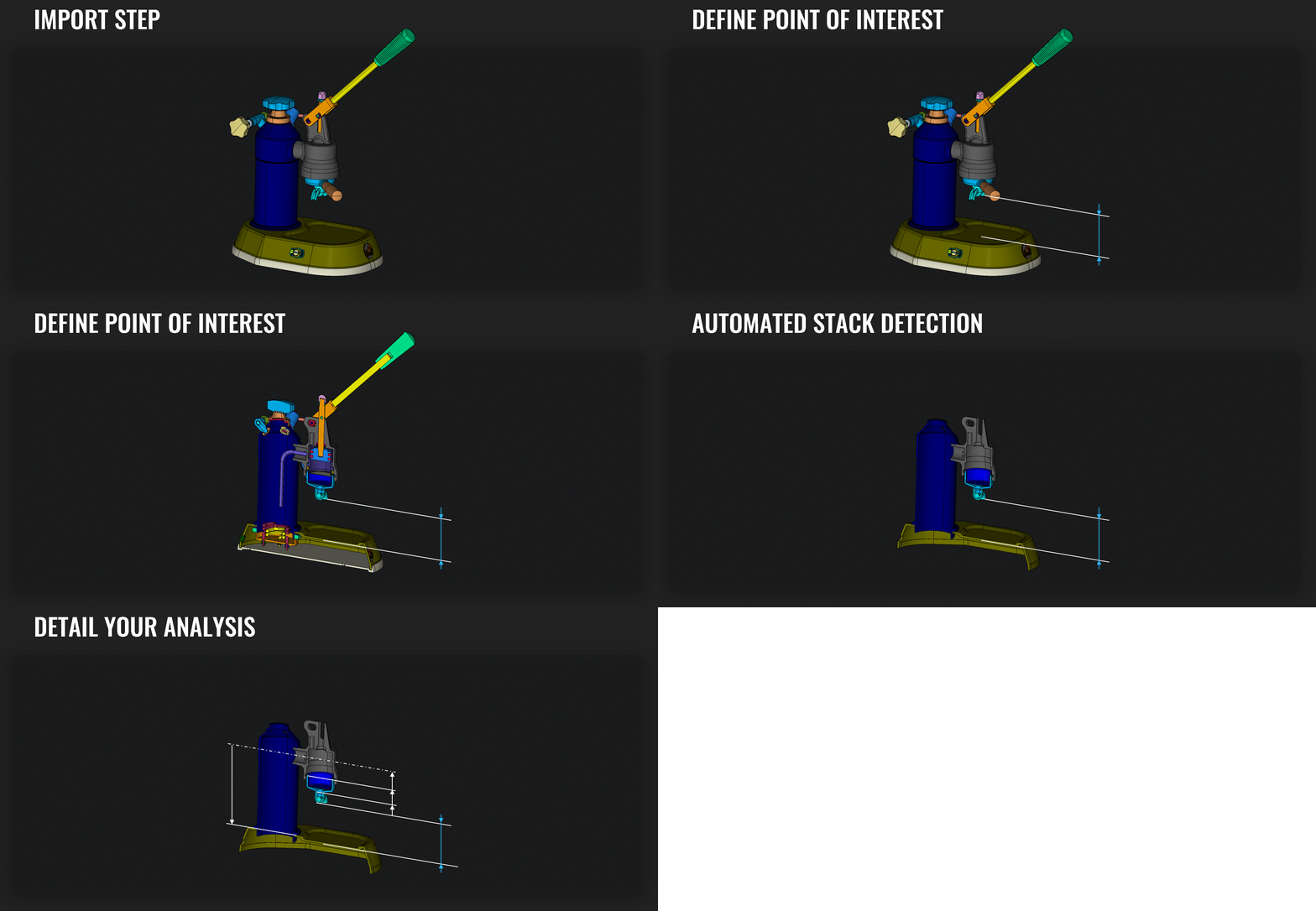
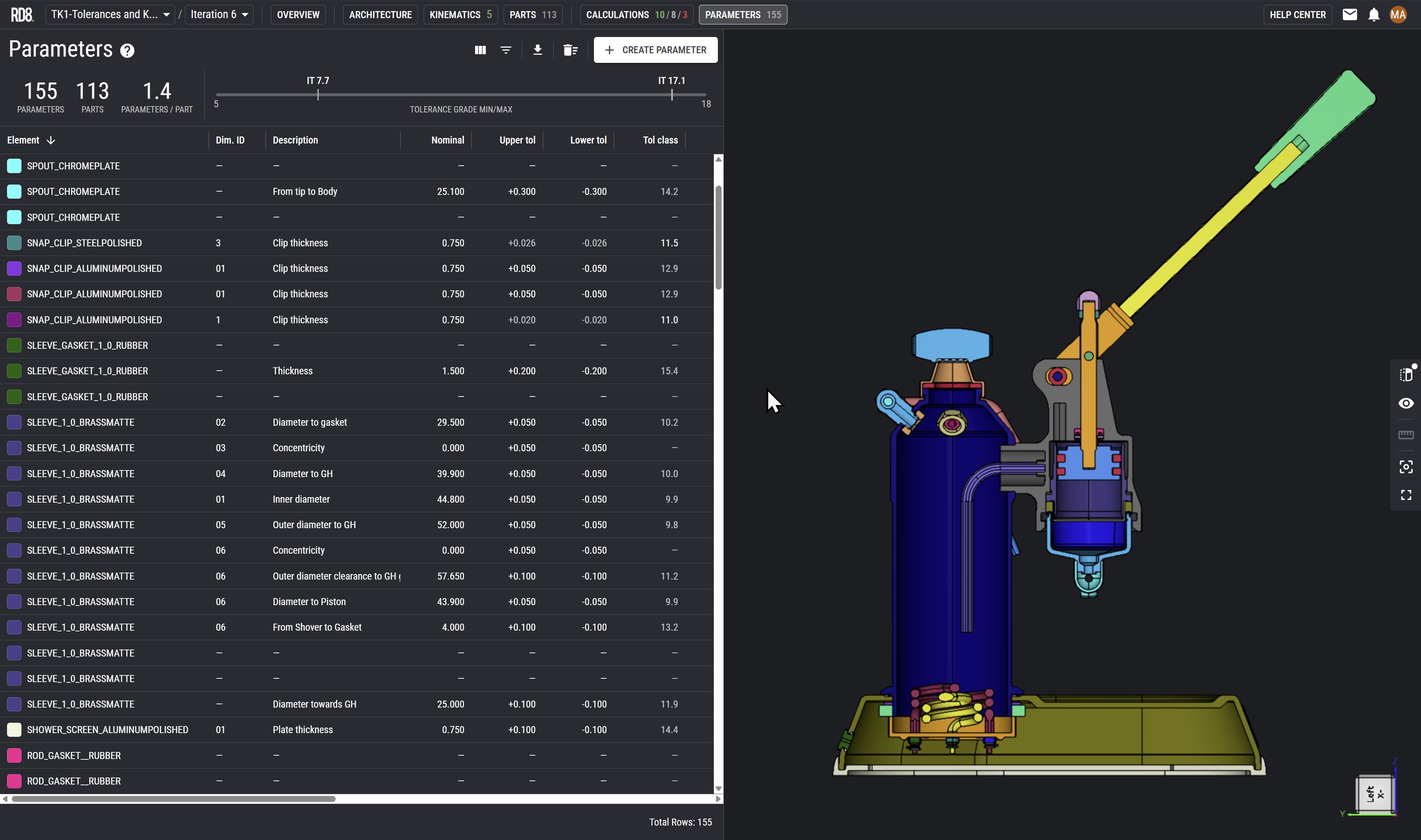
Detail and document your analysis - 1D, 2D, 3D, or non-linear stacks - based on parameters lists, smart lookups, and GD&T/GPS notation.
Analyse your calculations by 'Worst Case', RSS, 'Statistical' and 'Monte Carlo Simulations'. Perform sensitivity analysis, and test different scenarios.
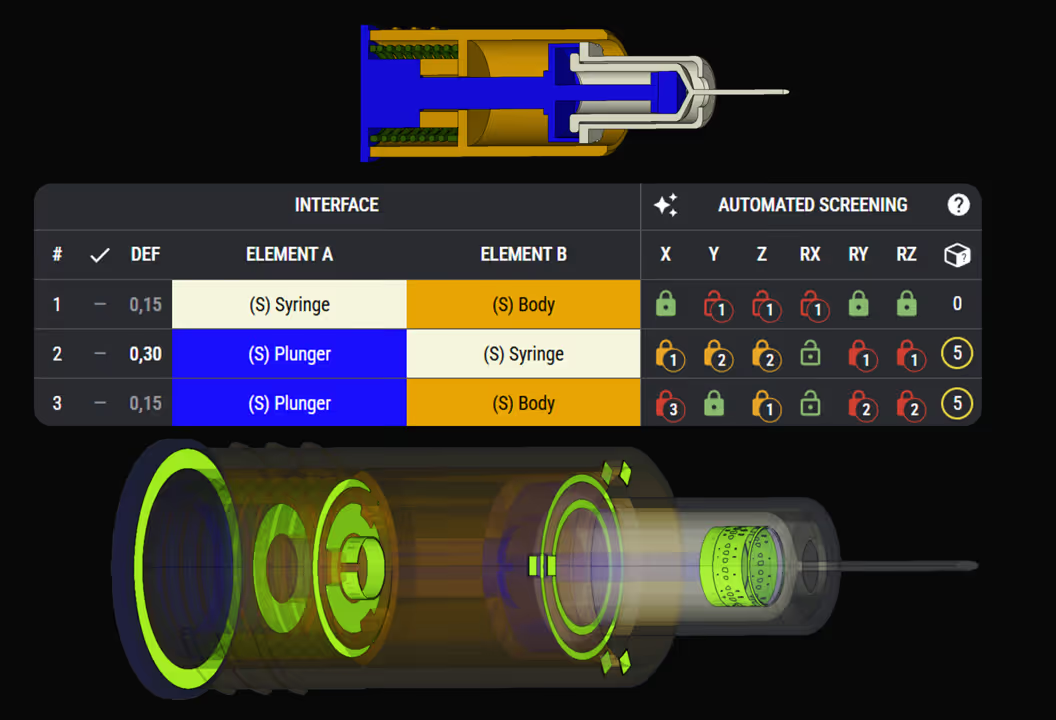
Checks for overconstraints and geometry optimization points by RD8 Interface Analysis
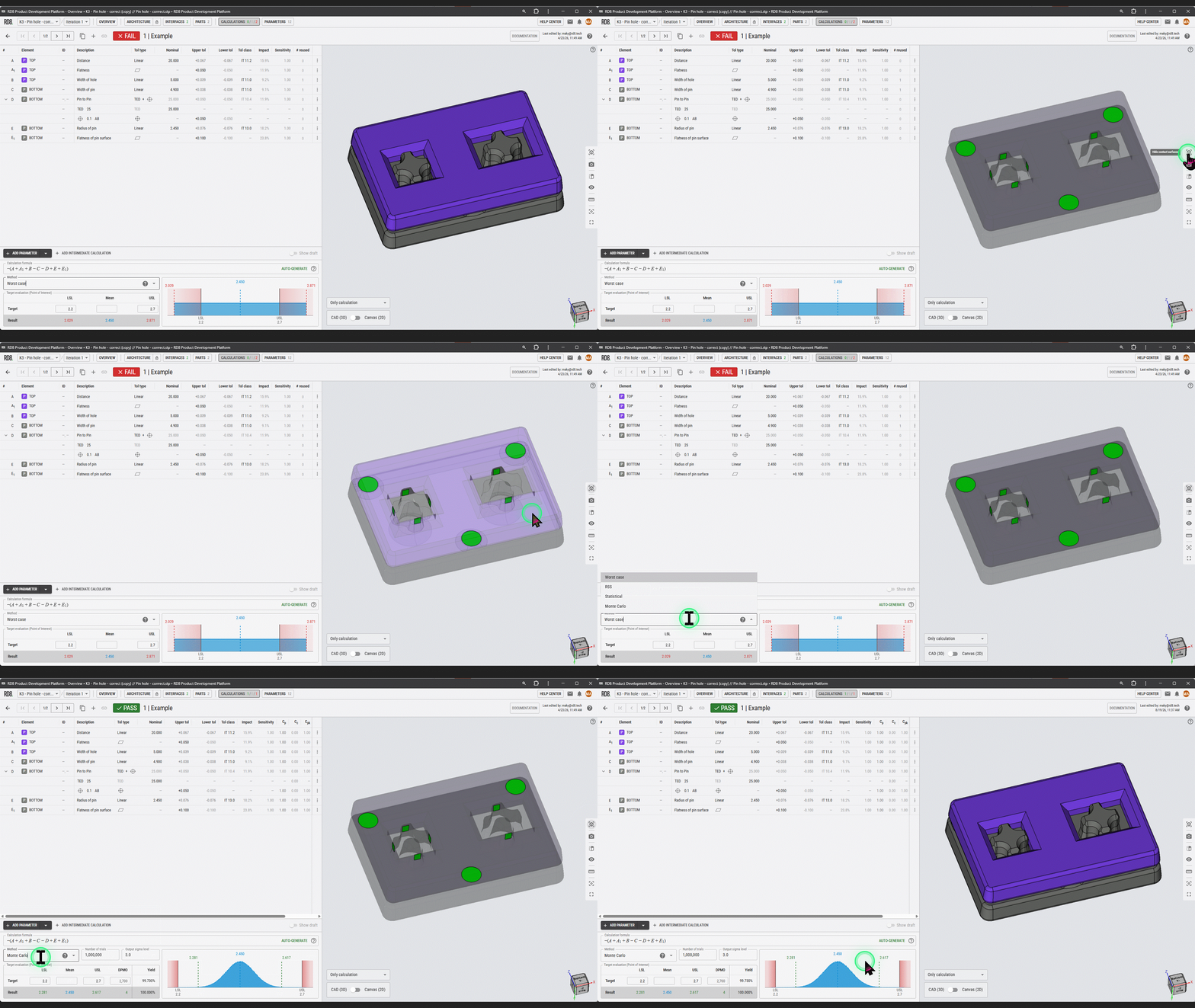
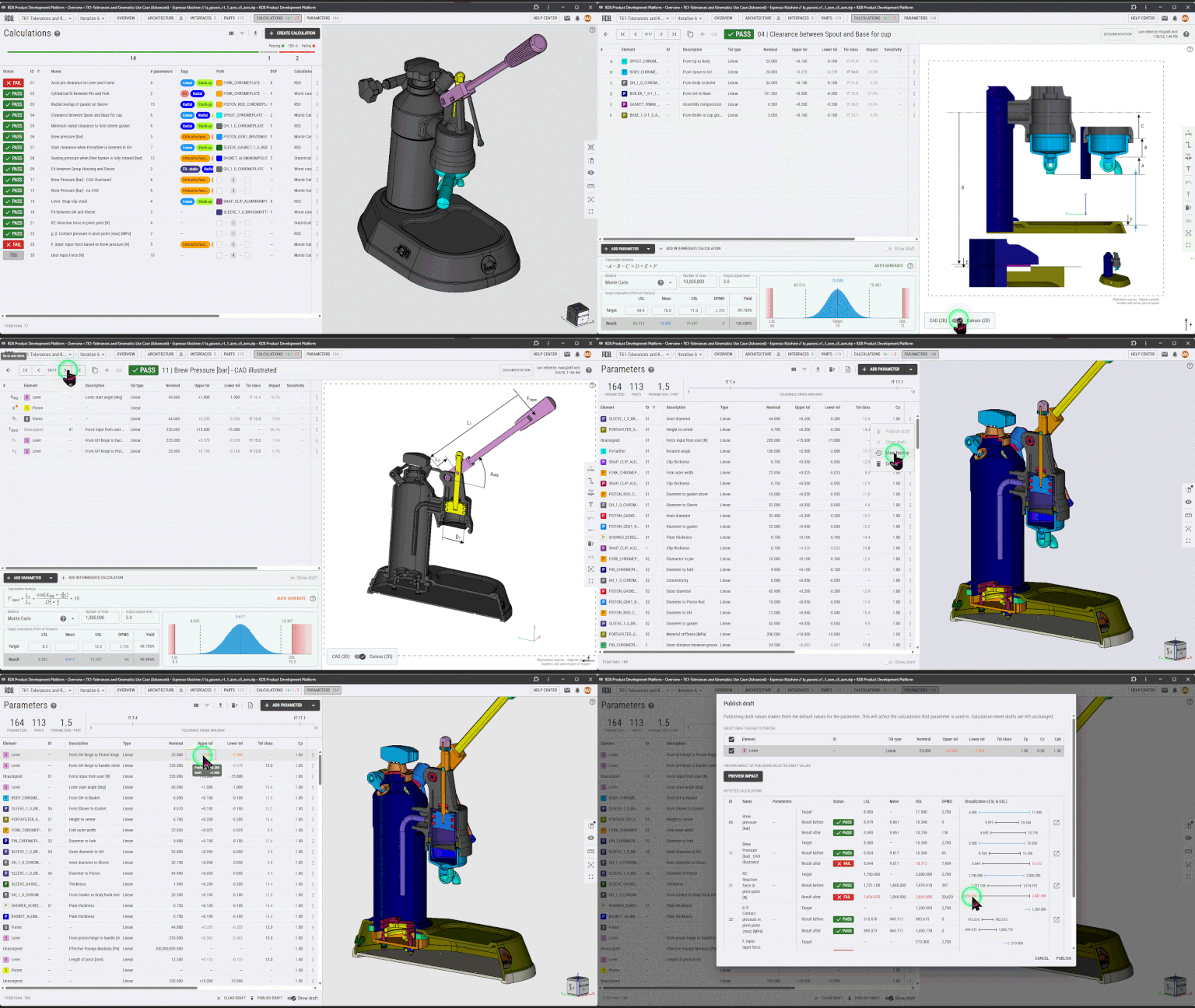
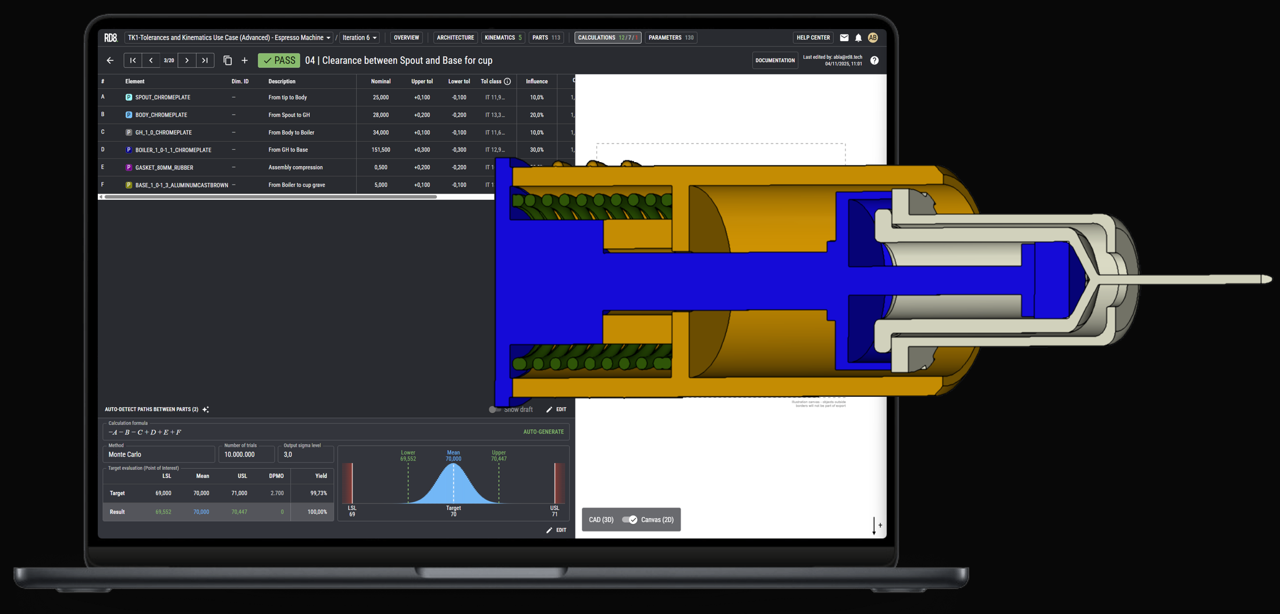
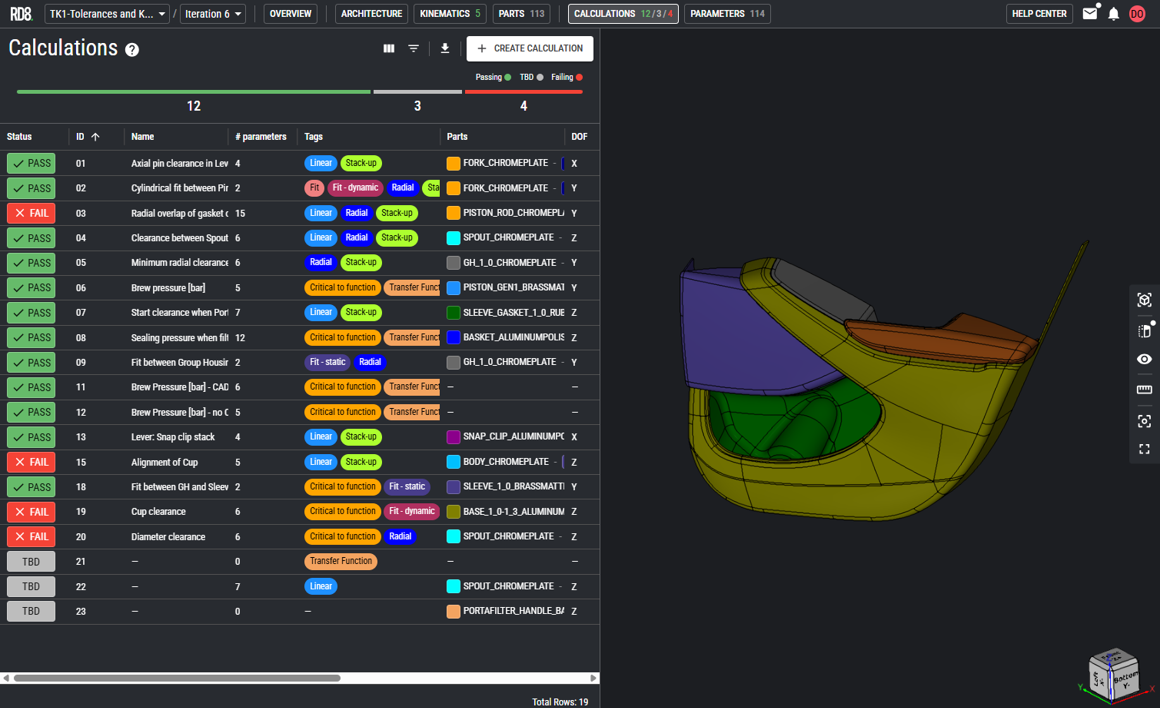
Manage all your calculations from a user-friendly interface where everything is up-to-date and documented.
Test ideas or scenarios with 'What if'-analysis.
Trace progress throughout the development with full design history, collaboration- and iteration features.
Re-sync parameters with the CAD model in a few clicks.
Automated Tolerance Setup
and Sanity Checker
Automated Set Up
The RD8 Path Finder identifies the tolerance path(s) and makes it quick and easy to setup stacks.
Sanity Checker
Helps you identify if calculations are wrong or overcomplicated.

Analyze Faster.
Optimize Smarter.
Get Monte Carlo Results in seconds - not hours
Monte Carlo Simulations, Sensitivity Analysis, Draft Mode, Tolerance Lookup, and much more.
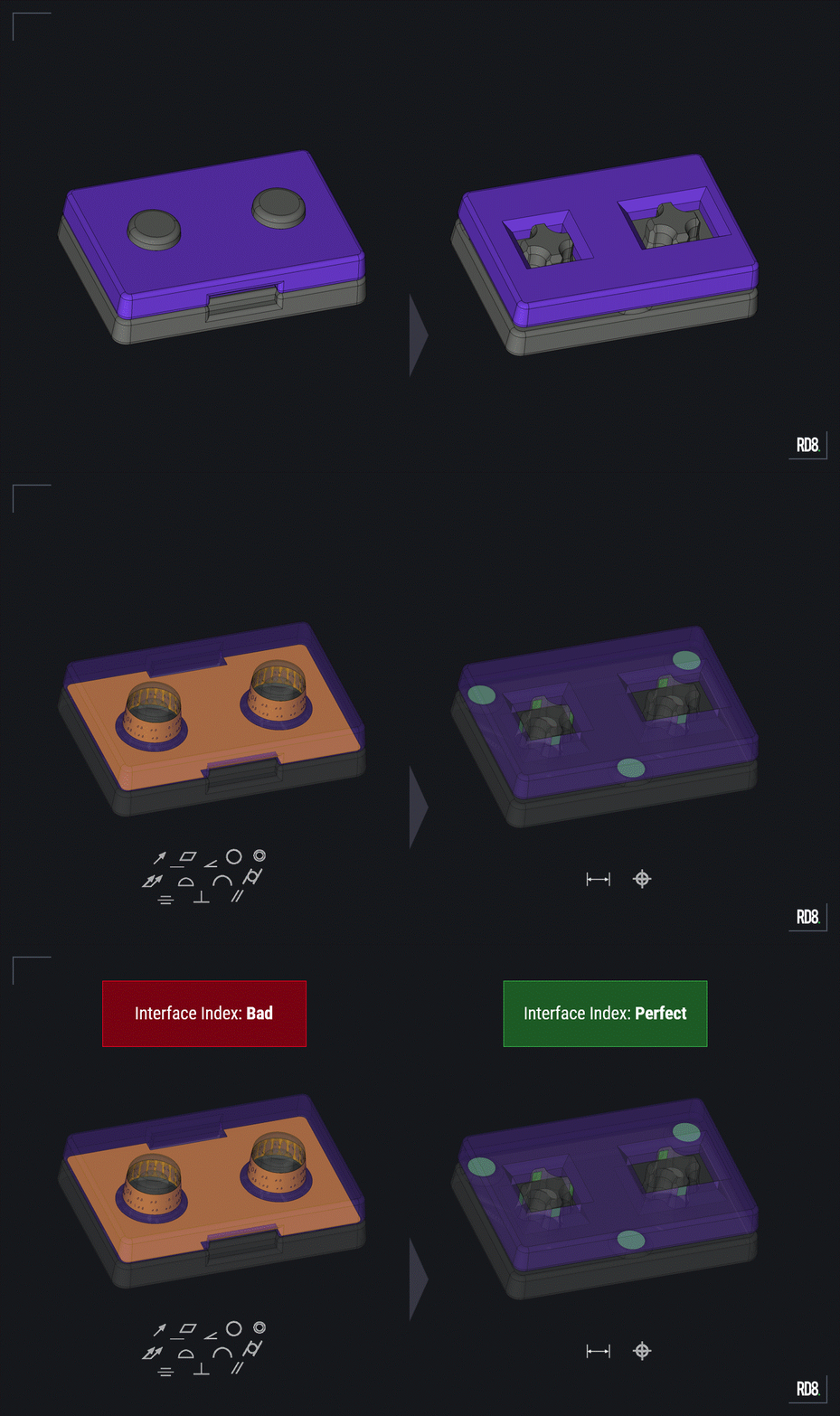
Interface Optimization Engine
RD8 automatically x-rays and evaluate your CAD assembly to reveal simplification options.
Complex Calculations Sets
– Made Easy.
- Always up-to-date overview of all calculations in a project.
- Built for collaboration
- Full documentation history and traceability
- 'What if' analysis
- Parameter database
...and much more

Do you know the quality of your design?
FIRST
Optimize the design first before moving commas, and pushing manufacturing processes. Smart geometry eliminates the need for tight tolerances.
THEN
Dimension, and cleverly allocate tolerances to reach ultimate performance.
RD8 is built on unique - unmatched - interface technology that ensures clean interfaces which is the foundation for correct tolerance analysis.
RD8 Software has the World's First Interface X-ray that identifies and analyses mechanical interfaces direct from a 3D model.
This technology enables automatic tolerance stack-up set up and sanity checks for errors.
95% of profit is based on the 'Design Quality' - not manufacturing.
Purpose-Built Tolerance analysis software for mechanical Engineers
The RD8 Tolerance Stack-Up and Optimization Software helps mechanical engineering teams bring tolerance analysis into daily development workflows to handle variation.
Purpose‑built for mechanical designers to handle simple and complex assemblies. RD8 delivers predictable, traceable, and repeatable calculations without the limits of spreadsheets or ad‑hoc processes.
Dimensional management by tolerance analysis, simulation of variation and optimization of CAD geometry is the key for functional performance and product quality.
Sign up for a Free Trial
By submitting, you accept RD8's Privacy Policy and Terms of Service.
Explore core capabilities of RD8 Tolerance Analysis Software
RD8 tolerance analysis software provides automatic stack-up detection and analysis, parameter sync and easy collaboration to help mechanical engineers create better mechanical designs in shorter time.
Advanced 1D Tolerance Stack-Up Calculations
Statistical and Worst-Case Analysis
Kinematic and Functional Variation Analysis
Multi-user Collaboration and Version Control
Traceable Assumptions, Inputs and Results
Engineering-Ready Reports for Design Reviews PDF Export
CAD integration: SolidWorks, NX, CATIA, Creo via STEP
Smart Assisted Workflows
1D, 2D and 3D TOlerance Analysis with Worst case, RSS, and Monte Carlo
The RD8 Software works with 1D, 2D and 3D designs and tolerance stacks.
Linear stack-ups. Start day 1, no CAD model needed
Planar geometry, angles and simplified kinematics
3D Kinematic Analysis and 3D Interface Analysis
Our proprietary – world leading – mechanical interface engine will “X-ray” the design and reveal optimization points for unambiguous tolerance stacks PLUS simplify your stacks from complex 3D stacks to simple 1D- or 2D stacks.
Designed for engineers working on Must-not-fail products
Robust engineering software tailored for design teams with a focus on ‘must-not-fail product’ in high volume production in competitive sectors.
Based on Robust Design philosophy - to achieve Quality by Design (and not only relying on Quality by Production). Making clever choices up-front impacts 95% of the cost of the product.
What's the difference? Why is RD8 Unique?
RD8 is designed for the many—not the few. Where traditional tolerance analysis tools often require deep specialization, long training cycles, or highly manual workflows, RD8 focuses on making rigorous analysis accessible to every engineer from day 1 of the project. The result is a tool that stays technically precise while remaining fast, intuitive, and usable in everyday development work.
Below is a high‑level view of what sets RD8 apart.
Made to be used from Day 1 of a Project
Automatic Set-up of Stacks
Tolerance Stack Optimization
3D Stack Simplification Features
Quality Check of Ambiguous Stacks
Unique Calculation and Product Overview
Interlinked Calculations and Relations
Built for Collaboration
Design Notes and Design Reviews
Built for Speed
How does RD8 compare to other tolerance analysis software?
RD8 is designed for the many — not the few.
Where heavyweight tolerance analysis tools often require deep specialization, long training cycles, or highly manual workflows, RD8 focuses on making rigorous analysis accessible to every engineer from day 1 of the project.
The result is a tool that stays technically precise while remaining fast, intuitive, and usable in everyday development work.
Below is a high‑level view of what sets RD8 apart.
Tolerance Analysis Software for different engineering environments
RD8 is designed to cater and adapt to different engineering environments, product complexities, and organizational maturity levels.
Tolerance Analysis for Life Science: Drug Delivery Devices/Autoinjectors and Medical Devices
Where failure is not an option.
Quality is key.
Documentation and design history is mandatory.
Failures are not an option.
Tolerance Analysis for Industrial- and Consumer Products
Suited for companies with high volume, quality demands and a constant focus on cost and new innovation.
Tolerance Analysis for Automotive
Coordination between many stakeholders. OEMs, Tier 1, Tier 2, Tier 3.
Competition is fierce.
High requirements to be most competitive in three dimensions: quality, delivery and cost.
What can engineering teams achieve with RD8 Tolerance Analysis Software?
+50% Reduction of Critical Tolerances
In more than 50% of cases we see a potential +50% reduction of GD&T modifiers, number dimensions, and relaxation of tight tolerances.
No other tools are able to spot overconstraints and highlight them based on the actual CAD geometry instead of manual constraints.
6X Faster Analysis than Heavyweight Tools
We see customers do analysis in 30 min, which normally takes 180 minutes in heavyweight tolerance analysis software applications (six times faster).
We see a 3-10X increase in speed compared to Excel depending on stack-complexity. In some cases a +100X increase if you include lost work/update work in Excel.
Fewer Quality Issues
Improved yield of production, less NC's, less recalls, less warranty cases.
Faster Development Cycles
Increased confidence in designs. Fewer design loops.
Rock Solid Documentation
Captured design decisions and engineering rationales
Team Spirit
Free teams for unnecessary hassle and let them focus their energy on product improving activities instead of an "updating-nightmare".
Part Cost Reductions
Reduction of part cost by easing technical requirements to the parts (by design)
Total Cost Reduction
Reduction of down stream effects: warranty costs, assembly cost, supplier selections, QA, reputation cost...
Tolerance Analysis Software Supported By Engineering consultancy
RD8 Software is built on the practical experience of engineers who have spent years perfecting tolerance analysis in real projects, ensuring the software reflects how experts actually work.
During onboarding, the same consultants guide your team through models, workflows, and best practices, so you gain a solid and confident foundation from day one. This close link between expert consultancy and software gives users both a proven tool and the guidance needed to apply it effectively.
HOW TO CHOOSE THE RIGHT TOLERANCE ANALYSIS SOFTWARE
Follow the steps to choose the right Tolerance Analysis Software for your team.
1. Evaluate Your Own Readiness
2. Identify Calculation and Collaboration Needs
3. Assess Usability and Engineering Adoption
4. Consider Long-Term Scalability and Support
Explore features of the RD8 Software
Assisted Setup
Analyse and Optimise
Complexity Made Easy
Preview Parameter Changes
Frequently asked questions about RD8 software
Below you will find frequently asked questions about Tolerance Analysis Software. If you have any further questions about the RD8 Software and how it can work for you, reach out to us.
What is Tolerance Analysis Software?
Tolerance Analysis Software or Computer-aided Tolerancing (CAT) is software that helps mechanical engineers, designers, leaders to simulate variation of physical parts to optimize dimension and tolerances.
Software is used to go beyond excel spreadsheets to:
- Reduce manual errors
- Manage large data sets
- Run Monte Carlo simulations
- Keep track of versioning
- Collaborate seamlessly
- Look-up tolerances
- Streamline workflows and quality of analysis
- Make documentation of results and assumptions
- Speed up the design process
RD8 stands out as a tool that:
- Provides full overview of multiples stacks and relations.
- Can be used from the early design state.
- Can be used through the design process and easily syncs with the 3D CAD model.
- Work with 1D-, 2D-, 3D-, non-linear calculations (can do Worst Case, RSS, Statistical and fast Monte Carlo Simulations).
- Does automatic tolerance stack-up detection and setup.
- Has a unique optimization feature - automatic identification and highlight of overconstraints. Checks DOFs in 3D.
- Is fast and easy to use.
Why is Tolerance Analysis Critical in Mechanical Design?
Tolerance analysis is essential for ensuring that parts fit together and function as intended.
It impacts:
- Product functionality - ensuring that the product always work, in all conditions, also when an assembly consists of parts all pushed to their limits of their tolerances
- Cost efficiency - Reduce need for tight tolerances, inspection, reduce scrap, expensive redesigns
- Reliability and quality - Deliver products that meet performance standards consistently
Not performing a proper tolerance stack-up analysis can lead to unpleasant surprises, costly to fix downstream. By understanding and applying tolerance stack-up analysis, you can optimize design, improve manufacturability and maintain quality control throughout the product lifecycle.
This task is often postponed late into the design process - then revealing issues that can only be solved by making more precise parts (which is costly, more time consuming, harder to source or keep in control).
Who Needs Tolerance Analysis Software?
Companies who wants to excel in dimensional management, critical-to-quality themes, or that in general want’s to predict quality before starting production.
Typically mechanical engineering teams in automotive, life science (med-tech), industry, or aerospace.
What Methods does RD8 Support?
RD8 supports 1D stacks, 2D stacks, 3D stacks, and non-geometry related stacks (e.g. calculation of friction forces, springs, snap fits, etc.).
RD8 supports worst case, RSS, statistical and Monte Carlo methods and have some of the fastest solvers.
All results and assumptions are presented in a user-friendly interface.
Can RD8 Software consider friction, pressure, forces, springs?
Yes. RD8 Software can handle all calculations as long as you have a mathematical expression.
Here's a couple of examples of:
- how to do non-linear calculations (how to calculate pressure in an espresso machine): Tutorial: How to setup a non-linear transfer function - YouTube
- how to calculate dosing accuracy: Episode 4: Parameter Sensitivity and Optimization | How to setup a tolerance stack
Springs, seals, forces can be calculated as well.
Does RD8 Support GD&T-Based Tolerance Stack-Up Analysis?
Yes. RD8 supports GPS and GD&T notation.
How Long Does It Take to Implement RD8 Software?
Typically 1 month.
Onboarding consist of 2x4h online class room training, supported by online training material.
After class room training users are supported for approximately 30 days in 'hypercare' to assist the user to apply the software to their everyday tasks.
Set up a free RD8 Software Trial for your team
✓ Intial Set-up Call ✓ No Install ✓ ISO27001 Certified
Day 15: decide what's next.
The process:
Bring your CAD file(s) or case(s). Otherwise RD8 can provide sample files.
By submitting, you accept RD8's Privacy Policy and Terms of Service.
